


Stem Separator
Split a song into vocals, drums, bass, piano, acoustic guitar and electric guitar. Get one stem on its own, a mix of the stems you choose, or the track without them.
Build the LALAL.AI SDK into your software or device. It runs on your users’ computers, your own servers or embedded boards and does not send your audio to our servers. Stem separation includes a low-latency mode for live audio.
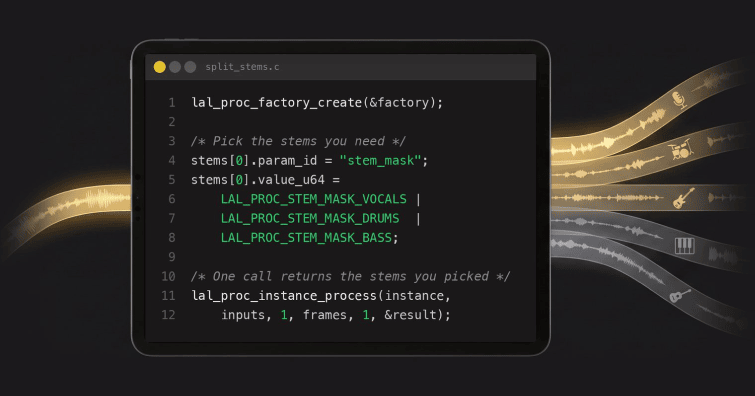
Split a song into vocals, drums, bass, piano, acoustic guitar and electric guitar. Get one stem on its own, a mix of the stems you choose, or the track without them.
Remove background noise, instrumental music and other sounds from speech. You get two outputs: the clean speech and the isolated background audio.
Made for speech. For vocals in songs, use Stem Separator.
Reduce room echo and reverb in recorded speech. You get two outputs: the voice with less reverb and the isolated reverb.
For recordings with background noise, run Speech Cleaner first.
Streaming works on small blocks of audio as they arrive, non-streaming on large ones.
| Streaming For live audio with the lowest delay. | Non-Streaming For stored audio and batch jobs. | |||
|---|---|---|---|---|
| Latency | Low (~100 ms model latency) | Adjustable; lower latency takes more compute | ||
| Throughput | Lower than non-streaming | High | ||
| Platforms | Windows, macOS, Linux x86_64 and embedded Linux boards with an NPU | Windows, macOS and Linux x86_64 | iOS and Android builds are made on request. We confirm the modes for your device during evaluation. | |
| Features | Stem Separator
In development
| Stem Separator
Speech
| ||
One C API from your backend to your devices. Packages for Windows, macOS and Linux are ready for evaluation. We build the SDK for your board or phone.
Packages Ready
x64
GPU (DirectML) or CPU.
13.3+, Apple silicon
Core ML or CPU. Intel builds on request.
x86_64
NVIDIA GPU (CUDA) or CPU.
Run it on a workstation or a server. Several instances can run in parallel; your hardware sets the limit.
Built for Your Target
Allwinner, Rockchip, Amlogic and Sophgo.
Some configurations run on boards with as little as 128 MB of RAM. Capabilities depend on the target platform.
Requires the chip vendor’s NPU driver.
See the SDK on a real board: Stem Splitter Box.
Built for Your Target
iPhone and iPad with Core ML.
Phones and tablets; support depends on the chipset.
We confirm the feature set for each device class during evaluation.
Port Assessed With You
Share your toolchain, the model operations your NPU supports and its runtime.
We assess the port and plan the integration with your engineers.
Clean dialogue, remove room echo and background noise inside your editor, with nothing uploaded.
Isolate the dialogue and keep the music and effects as a separate track, on your own infrastructure.
Let students isolate an instrument to learn a part. Let DJs split tracks into vocals, drums, bass and piano live, during a set.
Clean up speech before transcription or archiving, on your servers or inside your app.
Add sing-along and play-along modes that run on your device.
Process material that cannot leave the facility: archives, unreleased content and projects under NDA.
The SDK processes audio inside your product and does not send it anywhere. Use it for content you cannot upload to a cloud service.
Separate stems as the audio arrives, with low latency. Our web app and API work only with uploaded files.
You do not pay LALAL.AI for processing minutes.
Use the same C API in your backend, your apps and your devices.
Tell us what you are building, which features you need and where they will run.
Test an evaluation build with your own audio on your own hardware. We help you integrate the SDK and assess the results.
If you decide to proceed, we agree on commercial terms. Your build includes only the features you license.
A C API for your audio pipeline. Choose your features, pass decoded audio, read the output buffers. The same calls work in streaming and non-streaming mode.
Excerpt: processing decoded audio after setup.
const float *inputs[] = {pcm};
CHECK(lal_proc_instance_process(
    instance, inputs, 1, frames, 1, &result));

for (size_t i = 0; i < result.output_buffer_count; ++i)
    save_stem(i, result.output_buffers[i],
result.produced_frame_count);Load the SDK and see which features your build contains.
Pick vocals, drums, bass or other outputs with one parameter.
Set the sample rate, the buffer layout and the processing mode.
Pass blocks of decoded audio of any size. Every mode uses the same calls.
Each output comes back as its own buffer, ready for playback or export.
#include <stdio.h>
#include <lalalai_proc_capi.h>

#define CHECK(call) \
    if ((status = (call)) != LAL_PROC_STATUS_OK) goto done

/* find_feature() and save_stem() are app helpers,
   not SDK functions. find_feature() picks a
   non-streaming feature with a stem_mask parameter. */

/* Split a decoded stereo track into drums and bass */
int split_drums_and_bass(const float *pcm, size_t frames,
                         double sample_rate)
{
    lal_proc_status_t status;
    lal_proc_factory_t *factory = NULL;
    lal_proc_instance_t *instance = NULL;
    lal_proc_process_result_t result = {0};

    CHECK(lal_proc_factory_create(&factory));

    /* Choose the stems you need */
    lal_proc_init_param_value_t stems[] = {
        {"stem_mask",
         LAL_PROC_STEM_MASK_DRUMS | LAL_PROC_STEM_MASK_BASS},
    };
    lal_proc_instance_config_t config = {
        .struct_size = sizeof config,
        .input_sample_rate_hz = sample_rate,
        .buffer_layout = LAL_PROC_BUFFER_LAYOUT_INTERLEAVED,
        /* OFFLINE: process stored audio as fast as possible */
        .processing_mode = LAL_PROC_PROCESSING_MODE_OFFLINE,
        .init_params = stems,
        .init_param_count = 1,
    };
    const char *feature = find_feature(factory, "stem_mask");
    CHECK(lal_proc_factory_create_instance(factory, feature,
                                           &config, &instance));

    /* Process a block of decoded audio */
    const float *inputs[] = {pcm};
    CHECK(lal_proc_instance_process(instance, inputs, 1,
                                    frames, 1, &result));

    /* Each output is a selected stem, the rest of the track
       or their mix */
    for (size_t i = 0; i < result.output_buffer_count; ++i)
        save_stem(i, result.output_buffers[i],
                  result.produced_frame_count);

done:
    if (status != LAL_PROC_STATUS_OK)
        fprintf(stderr, "SDK error: %s\n",
                lal_proc_last_error_message());
    lal_proc_instance_destroy(instance);
    lal_proc_factory_destroy(factory);
    return status == LAL_PROC_STATUS_OK ? 0 : -1;
}
Check every returned status. The package examples cover setup, streaming and cleanup.
The SDK is a shared library. Include the libraries with your app. Linux GPU builds need CUDA 12 and cuDNN 9 installed separately. Embedded builds require the chip vendor’s NPU driver.
Each package includes the license notices for its third-party components.
Pricing depends on your project. The evaluation build is free, and we agree on commercial terms if you decide to license the SDK.
No. The SDK processes audio locally and does not send it to LALAL.AI.
The SDK runs on a CPU or on a GPU or NPU. On embedded boards, it uses the chip’s NPU. During evaluation, we confirm which features and modes your hardware supports.
Under your license, you can ship the libraries your product needs to run. Headers, documentation and examples stay with your team.
The plugins are ready-made tools that run inside a DAW or video editor. The SDK is a library your developers build into your own product. To process files in the cloud, use our web app or API.
It separates speech from other sounds and does not depend on the language.
Tell us about your project and ask for a free evaluation build to test with your own audio.
Request SDK Access


 Streaming
 Non-Streaming
 Desktop and Server
 Packages Ready
 Windows
 macOS
 Linux
 Run it on a workstation or a server. Several instances can run in parallel; your hardware sets the limit.
 Embedded Linux Boards
 Chips With an NPU
 Mobile
 Android
 Other Chips
 A New NPU or SoC


