


Local Processing
Your audio stays right where it belongs—on your computer. No uploading to servers, no waiting for downloads, and no privacy worries.
Extract vocals, instrumentals, and separate instruments in your DAW—instantly, privately, and without leaving your workflow..
By downloading, you accept the End User License Agreement.

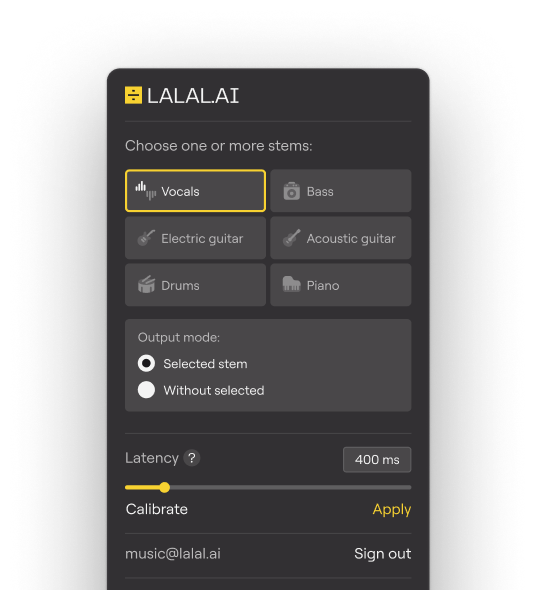
AI-powered stem separation is now part of your everyday production process. Just add the plugin to your project, select what you want to extract, and get clean, ready-to-use tracks in seconds. Everything happens locally, right on your computer.
Drop an audio file into your DAW project.
Load the plugin on the track, no extra setup required.
Select the stem you want to extract or remove from the track.
The plugin instantly splits the track into high-quality stems.
Your audio stays right where it belongs—on your computer. No uploading to servers, no waiting for downloads, and no privacy worries.
No limits on track count or length. Extract stems from full-length songs, albums, or sessions without artificial caps. Enjoy true workflow freedom.
With GPU and NPU support, separation takes mere seconds. Even on a basic laptop, you can get clean vocals or instrumentals immediately.
Designed to stay out of your way. Clean, focused workspace with no unnecessary menus or settings, so you can extract what you need fast.
Runs on Windows, macOS, and Linux. Compatible with Audacity and several open‑source Linux workstations. Familiar tools, no extra setup.
Works offline after license activation, with occasional subscription checks. All features stay available in any location, so your projects remain private.
Extract vocals or instrumentals from any track in seconds. Focus on your creative ideas instead of searching for stems elsewhere.
Create unique versions and smooth transitions right inside your usual setup, without needing extra tools or relying on online services.
Practice or rehearse with the tracks you already have, isolating vocals or instrumentals to concentrate on the parts that matter most.
Pair our plugin with free or budget DAWs. Achieve the same quality of separation as top-tier software suites without steep license fees.
Combine the offline VST plugin for DAWs with web access to LALAL.AI’s flagship cloud AI models.
VST3 format for Windows, macOS, and Linux. Processes all standard audio formats supported by your DAW (like WAV, MP3, FLAC, and more)..
LALAL.AI VST plugin works with any DAW that supports VST3. Tested successfully in Ableton Live, Reaper, and VST3-enabled versions of Audacity. Always use the latest version of your DAW for best results.
No, Pro Tools requires AAX format, while our plugin provides VST3 as the main format and AU (Audio Units) as a beta. We’re actively considering AAX support for future updates..
After loading an audio track into your DAW and inserting the VST plugin on it, follow these steps:.
Activation requires only one-time setup and enables full offline use afterward, with occasional internet connection for subscription validation. The license is node-locked to a single machine..
Verify VST3 folder paths are correctly set in DAW preferences, perform a plugin rescan, ensure 64-bit compatibility, and update your DAW to the latest version..
No free trial or demo is available. Test the full functionality with our Pro Month Plan subscription, a short-term option perfect for evaluating workflow fit without long-term commitment..
The license allows local audio processing within a DAW on up to three workstations, along with royalty-free commercial use of the resulting outputs for studio production, DJ performances, and advertising..
Strictly prohibited uses include, but are not limited to, server or SaaS applications for processing third-party audio, insertion into 24/7 broadcast chains, reverse engineering, and OEM embedding.
See full terms in the EULA.
For enterprise licensing, contact enterprise@lalal.ai.


