How to Remove Vocals from a Video on iPhone & Android
Step-by-step guide using the LALAL.AI mobile app: supports MP4, MKV, MOV, and more. Free preview available.


Can I remove vocals from a video directly on my phone?
Yes. Apps like LALAL.AI for iOS and Android process video files (MP4, MKV, AVI, MOV) on-device, no desktop required.
Does vocal removal affect video quality?
No. AI vocal removers only process the audio track; the video resolution and frame rate remain identical to the original file.
How long does it take to remove vocals from a video on iPhone or Android?
Processing a typical 2–5 minute video takes seconds to under a minute, depending on your internet connection and the app's server load.
Whether you want to create a clean instrumental for a dance TikTok video, strip a copyrighted song before posting on YouTube or Instagram, extract background music from a voiceover, or isolate speech for further editing, removing vocals from a video on your phone is now a matter of a few taps. This guide covers the fastest way to do it using LALAL.AI's mobile app for iPhone and Android, plus a comparison of other tools worth knowing.
Why Remove Vocals from a Video?
Vocal removal from video has real, practical uses across content creation, music production, and education:
- Content creators strip original vocals to add a cover version or swap the soundtrack before publishing on social platforms.
- Musicians and producers isolate the instrumental track of a reference recording to learn arrangements or create remixes.
- Dance and fitness instructors extract backing tracks from video clips for use in classes.
- Podcast and video editors remove background music from footage so dialogue sits cleanly in the mix.
- Karaoke fans turn any music video into an instant karaoke version.
How to Remove Vocals from a Video with LALAL.AI (iPhone & Android)
LALAL.AI offers a dedicated mobile app for both iOS and Android, powered by its proprietary Andromeda neural network, trained on four times more data than its predecessor and delivering up to 10% better signal-to-distortion ratio on benchmarks. Both versions support direct video file input and export stems in the original file format with no quality loss.
Get the LALAL.AI App — Free to Preview
Available on iPhone and Android. Preview your vocal removal before purchasing a single minute.
Step-by-step: Remove Vocals from a Video on iPhone
- Open the LALAL.AI app and tap Add Files.
- Select your video file from your gallery, Files, or iTunes. Supported formats include MP4, MKV, MOV, AVI, and M4V.
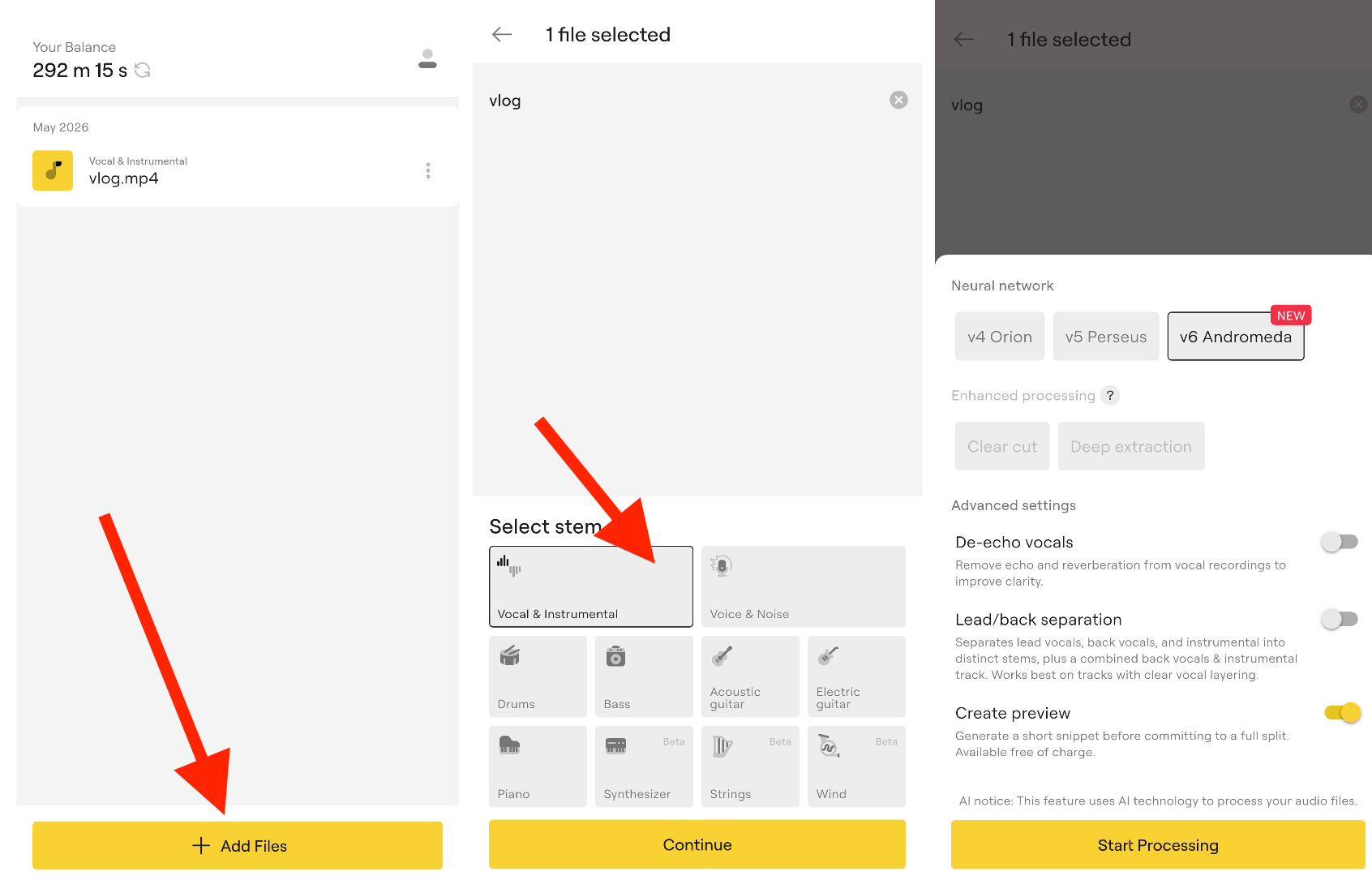
- Choose Vocal & Instrumental from the stem selection menu. Click Continue.
- Select the neural network. For vocals and instruments, opt for v6 Andromeda. For Voice and Noise stem, we recommend v5 Perseus.
- (Optional) Enable Preview mode to hear a short preview at no cost before committing to the full file.
- Tap Start Processing. The AI separates the vocal and instrumental tracks in seconds.
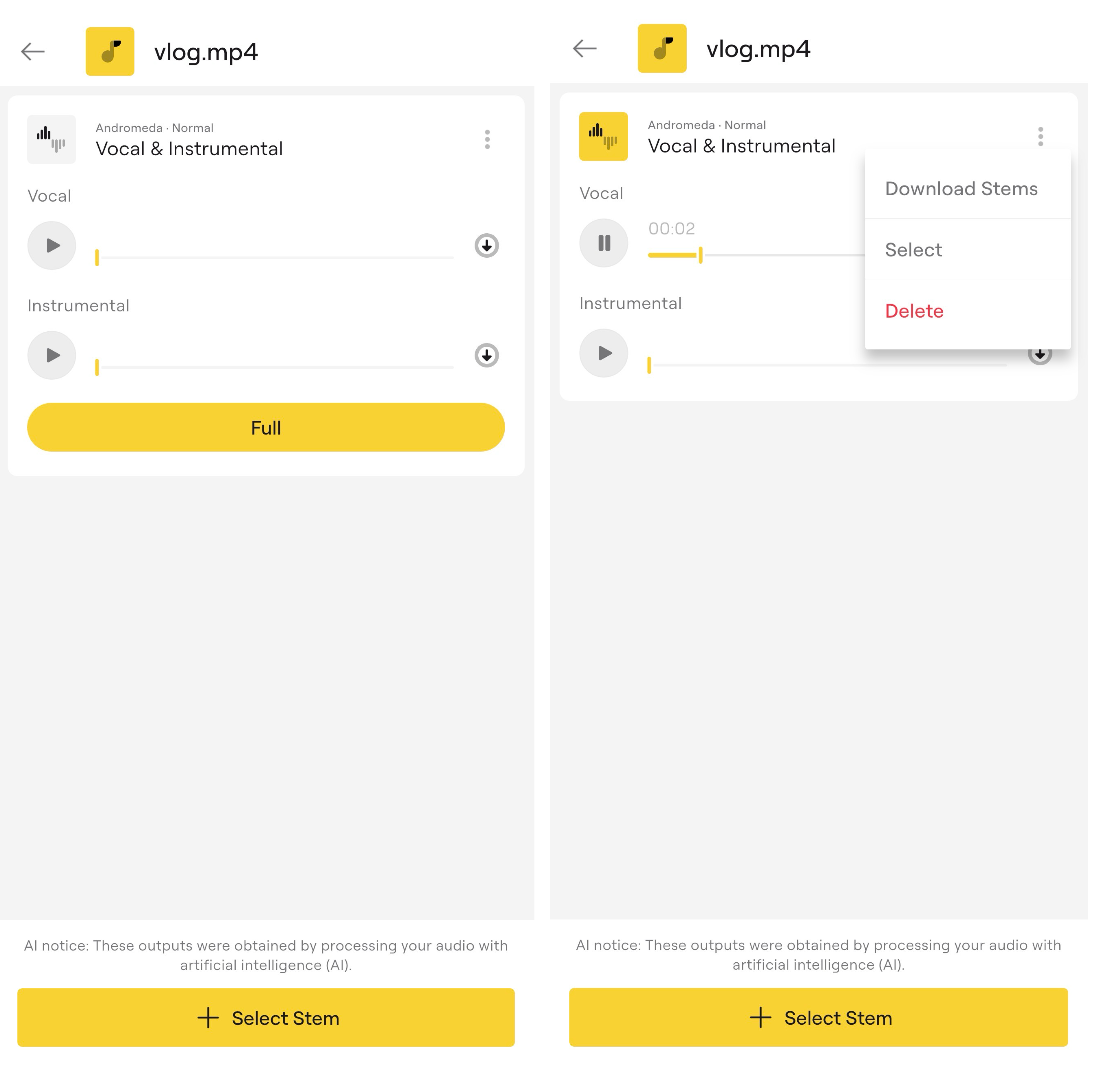
- Preview the track and click Full if you like the result.
- Tap Download Stems—one of them will have the vocals removed.
Step-by-step: Remove Vocals from a Video on Android
- Install LALAL.AI from the Google Play Store.
- Tap Split Files and select your video file. MP4, MKV, AVI, and MOV are all supported.
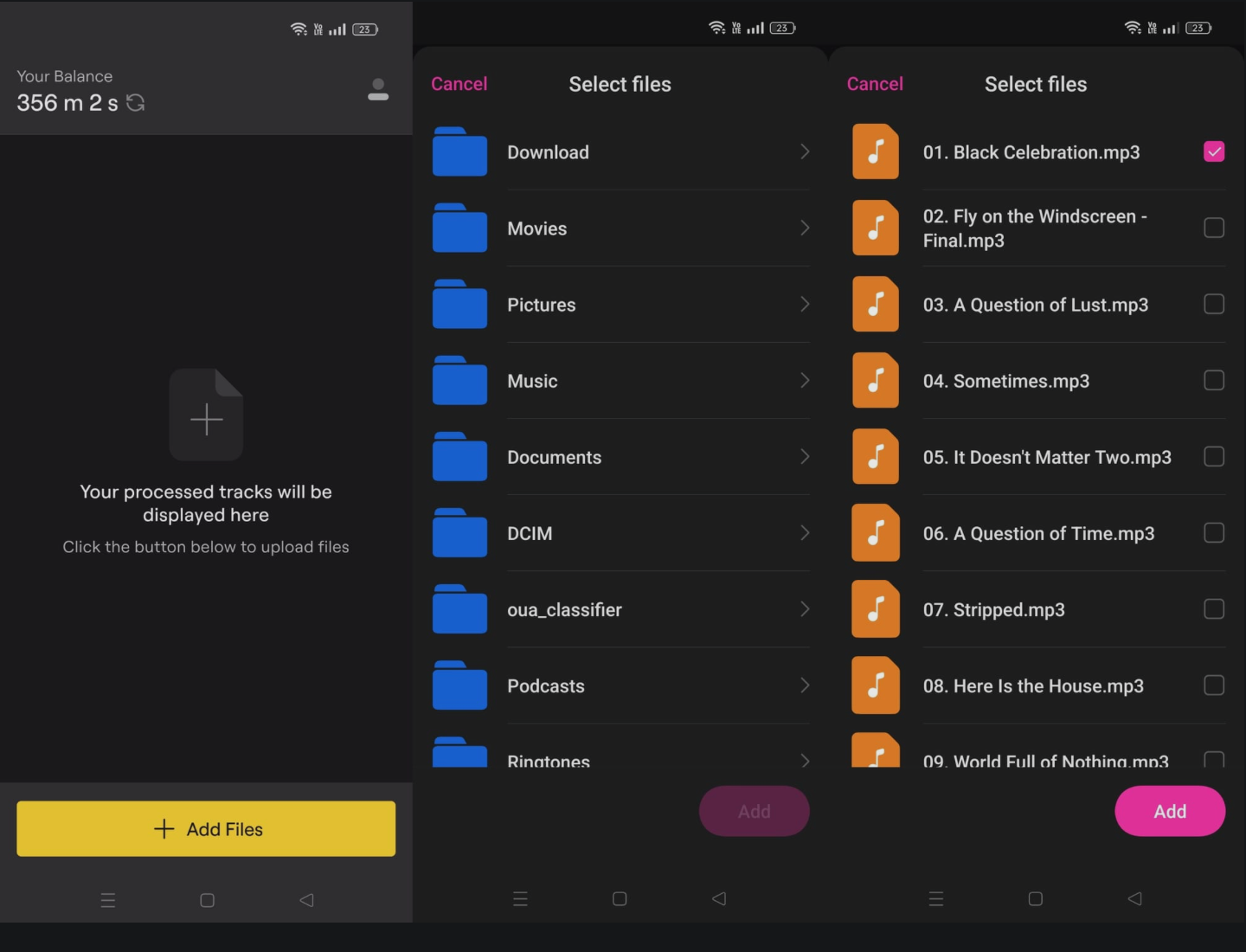
- Select the Vocal & Instrumental stem type.
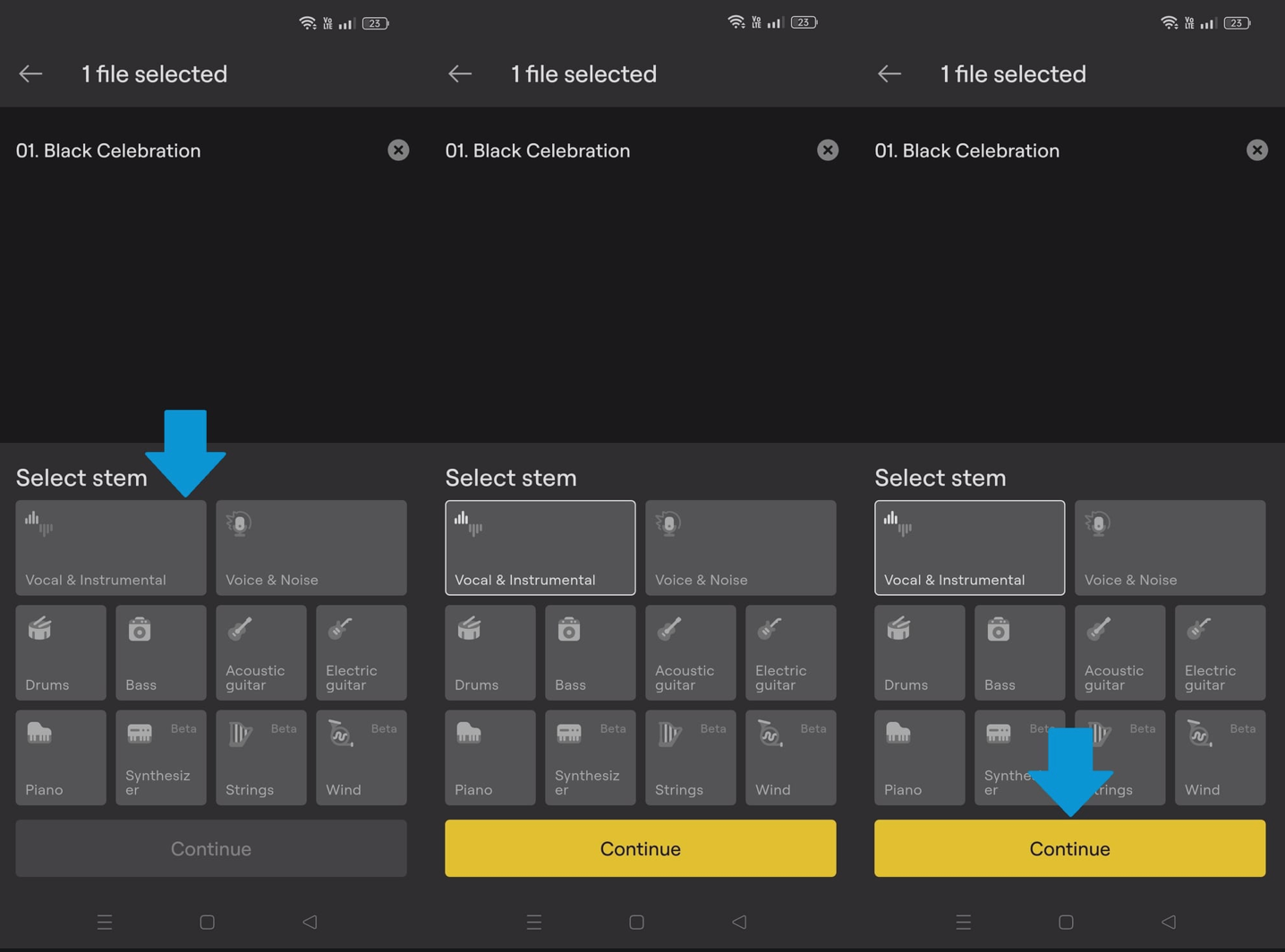
- Select the neural network. For vocals and instruments, opt for v6 Andromeda. For Voice and Noise stem, we recommend v5 Perseus.
- Use Preview mode to verify quality before processing the full file.
- Tap Start Processing. Results arrive in seconds.
- Press Full to process the entire file.
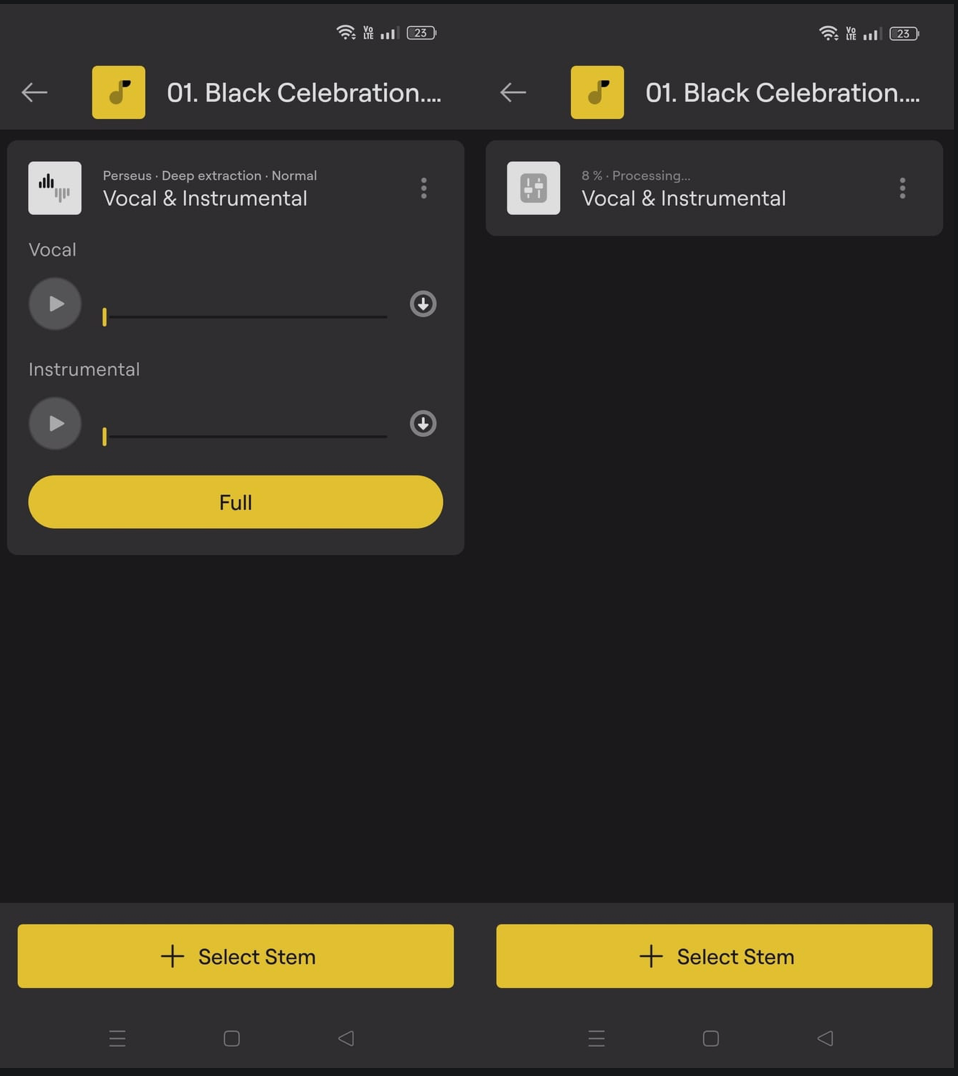
- Download the stems to your device storage.
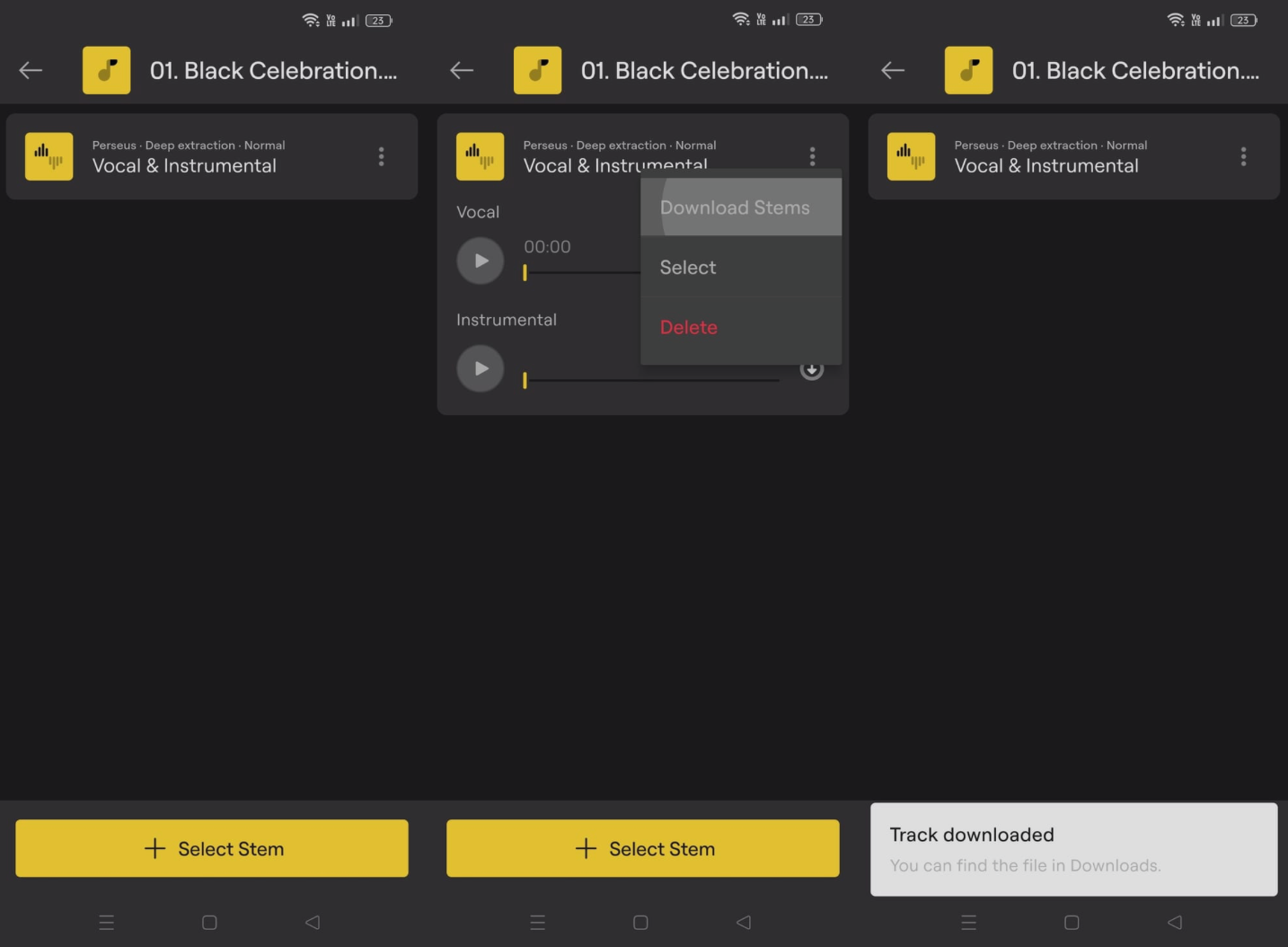
Both the iOS and Android apps run on the same in-house neural networks and deliver the same output quality — your choice of platform makes no difference to the result.
Multi-Stem Separation from a Single Upload
In July 2025, LALAL.AI added multi-stem separation from a single upload to its mobile apps. Instead of uploading the same video multiple times for different stems, you can now select vocals, drums, bass, or other stems from the same upload session, significantly reducing processing steps for on-the-go editing. LALAL.AI's mobile apps support up to 10 distinct stems:
- Vocal & Instrumental (most common for video work)
- Voice & Noise (for dialogue-heavy video)
- Drums, Bass, Acoustic Guitar, Electric Guitar
- Piano, Synthesizer, Strings, Wind Instruments
To do so, simply click on the file you want to process and tap +Select Stem. Then choose the required stem from the menu.
Best Vocal Remover Apps for iPhone & Android: Comparison
Not all mobile vocal removers handle video files natively or deliver the same output quality. Here is how the main options compare:
APP | PLATFORMS | VIDEO INPUT | 10-STEM SPLIT | FREE PREVIEW | IN-HOUSE AI | STARTS FROM |
|---|---|---|---|---|---|---|
| LALAL.AI | iOS, Android | ✔ | ✔ | ✔ | ✔ | Free preview; paid plans from ~$9.99/mo |
| Moises | iOS, Android | ✖ | ✔ | ✔ | ✖ | Free tier; Pro $3.99/mo |
| Vocal Remover Pro | iOS only | ✔ | ✖ | ✖ | ✖ | One-time purchase |
| Spleeter (CLI) | Not a mobile app | ✔ | ✔ | ✖ | ✔ | Free (requires technical setup) |
What Users Say
"As an Instructional Designer and Video Producer, I often find myself needing to clean up the soundtrack of podcasts and multi-camera shoots. LALAL.AI was so good at separating music from vocals that I was able to use it to separate background noise from vocals before they even had that feature officially." Review via Google Play
"My first try with 'Hand That Feeds' by NIN was flawless. I got a vocal track that was perfect and the effects were even removed so I could do what I wanted with them." Verified user review on LALAL.AI
Tips for Better Vocal Removal Results on Mobile
- Use the highest quality source file available. A 1080p MP4 at a high audio bitrate will produce noticeably cleaner separation than a compressed social media re-download.
- Always preview first. LALAL.AI's unlimited free previews let you check the output quality before spending any processing minutes.
- Use Voice & Noise stem for spoken-word video. For vlog footage, interviews, or instructional videos, the Voice & Noise stem removes background music and noise more precisely than the Vocal & Instrumental option.
- Batch upload for efficiency. Both mobile apps support uploading up to 20 files simultaneously, so process a whole project in one session.
Frequently Asked Questions
What video formats does LALAL.AI support on mobile?
The iOS and Android apps accept MP3, OGG, WAV, FLAC, AIFF, AAC, M4A, AVI, MP4, MKV, MOV. Most common video formats work without any conversion step.
Will removing vocals affect the video image quality?
No. The vocal removal process only touches the audio track. The video stream — resolution, frame rate, color — is unchanged.
Can I try LALAL.AI for free before paying?
Yes. The app offers free previews (short output samples) so you can evaluate separation quality before using any paid minutes. Full-length downloads require a paid plan.
How accurate is AI vocal removal from video?
Results are excellent on professionally recorded commercial music. Complex or lo-fi recordings with overlapping frequencies may produce some minor audio artifacts. Using the latest Andromeda neural network significantly reduces vocal bleed compared to older models.
Is it legal to remove vocals from a copyrighted video?
Vocal removal itself is a technical process, not inherently illegal. However, publishing the result publicly using copyrighted music without appropriate licensing may violate copyright law in your region. Always check the rights attached to any material you process.
Can I also remove vocals on desktop?
Yes. LALAL.AI offers desktop apps for macOS and Windows, as well as a web solution and VST plugin. All platforms share the same neural networks and minute balance, so you can start on mobile and continue on desktop seamlessly.
Key Takeaways
Removing vocals from a video on iPhone or Android no longer requires a desktop DAW or technical skills. The fastest and most accurate mobile solution in 2026 is LALAL.AI, which:
- ✓Accepts video files directly (MP4, MKV, MOV, AVI) on both iOS and Android
- ✓Processes separation in seconds using the Andromeda neural network
- ✓Exports the instrumental stem in the original file format with no quality loss
- ✓Offers unlimited free previews before any payment is required
- ✓Supports 10-stem separation and batch uploads (up to 20 files for premium users)
Download the app, preview your first video for free, and hear the difference that purpose-built AI makes.
Get LALAL.AI Mobile App →Follow LALAL.AI on Instagram, Facebook, Twitter, TikTok, Reddit, LinkedIn, and YouTube to keep up with all our updates and special offers.