How to Extract Vocal and Instrumental Stems from Video Clips
Want to make your own karaoke tracks or remixes from video clips? Learn how to easily remove or extract vocals and instrumentals from any video using LALAL.AI.


Updated: May 2026
Extracting vocals or instrumentals from a video used to require downloading the file, converting it to audio, running it through desktop software, and manually re-syncing the result. In 2026, AI-powered tools like LALAL.AI handle all of this in one step: you upload the video directly, and get separated stems back as audio or video files, without any conversion in between.
Why? There’s a certain magic in hearing your favorite song stripped down to its bare bones. Maybe it’s the raw emotion of the vocals, or the intricate details in the instrumental that you never noticed before. For a long time, this kind of musical deconstruction was reserved for sound engineers and remixers with access to studio multitracks. But the world has changed. Now, anyone with a laptop or even a smartphone can pull apart the layers of a track-even when that track is locked inside a video file.
This isn’t just a technical curiosity. In the age of TikTok, YouTube, and Instagram, the line between music and video is blurrier than ever. Songs are discovered in viral clips, movie scenes become memes, and sometimes the only version of a track you can find is the one embedded in a video. That’s why the ability to extract vocals or instrumentals directly from video has become so valuable – not just for musicians, but for content creators, educators, and fans.
But how does it actually work? What’s possible, what’s not, and what can you do with the results? Let’s take a closer look.
What Is Stem Separation? The Allure of Stems
First, a quick detour: what’s so special about stems? For musicians, having access to isolated vocals or instrumentals is a goldmine. It means you can practice singing or playing along with your favorite artist, remix a song in your own style, or even study the production techniques that give a track its unique sound. For content creators, it’s a way to use familiar music in new ways, maybe as a subtle instrumental bed for a vlog, or as a vocal hook in a mashup.
But for most of us, the only version of a song we can get our hands on is the finished mix. And if that song is in a video, things get even trickier. You can’t just "mute" the vocals or instruments, because they’re baked into the same audio file, tangled together in a way that seems impossible to separate.
Why It Used to Be Impossible to Isolate & Extract Stems Before
Anyone who tried to do this a few years ago knows the pain. The classic approach was to hunt for karaoke versions or acapellas online, but those are hit-or-miss, and rarely match the version you want. Some people tried phase cancellation tricks in audio editors, but the results were often muddy and full of weird artifacts. And if your source was a video, the first step was always to extract the audio, convert it to the right format, and hope nothing got lost along the way.
How Can You Use AI to Extract Vocal & Instrumental Stems from Any Video?
Everything changed with the development of AI-powered audio separation services. Suddenly, there were tools that could "listen" to a song and intelligently pull out the vocals, drums, bass, or other instruments. The results aren’t always perfect, but they’re often shockingly good. At the very least, good enough for covers, remixes, or just enjoying your favorite music in a new light.
What’s even cooler is that some of these tools now work with video files, too. So you can upload a TikTok, a movie scene, or any video you have, and the tool does all the work for you. You don’t have to mess around with converting files or fixing audio timing. You just get your separated tracks, audio or video, ready to use however you want.
A Real-World Example
Let’s say you stumble across a clip on social media – a live performance, a movie scene, or even just a meme with a catchy backing track. You want to sing along, remix it, or maybe just appreciate the instrumental. In the past, you’d be stuck. Now, you can simply upload the video to a modern stem separation service. These platforms work in your browser, but also offer desktop and mobile apps for every major system, so you’re not tied to one device.
How to Extract Vocals and Instrumentals from Video
If you want to try this yourself, here’s how you can do it using LALAL.AI, a service that works with video files directly and is available online, as well as through the desktop app (Windows, macOS, Linux) and mobile apps (iOS, Android):
1. Go to the LALAL.AI website or open the app on your device.
2. Choose the type of separation you want. You can select Vocal and Instrumental to get just the vocals or just the instrumental track.

If you’re feeling adventurous, you can also try advanced options to split out drums, bass, or other instruments.
3. Click or tap the Select Files button and upload your video. No need to convert your clip to audio first, just pick your AVI, MP4, or MKV file you have.

4. Pick your output format. you can choose to get your stems as audio files (MP3, OGG, WAV, FLAC, or AAC) or as video files in the original format of your clip, depending on what you need.
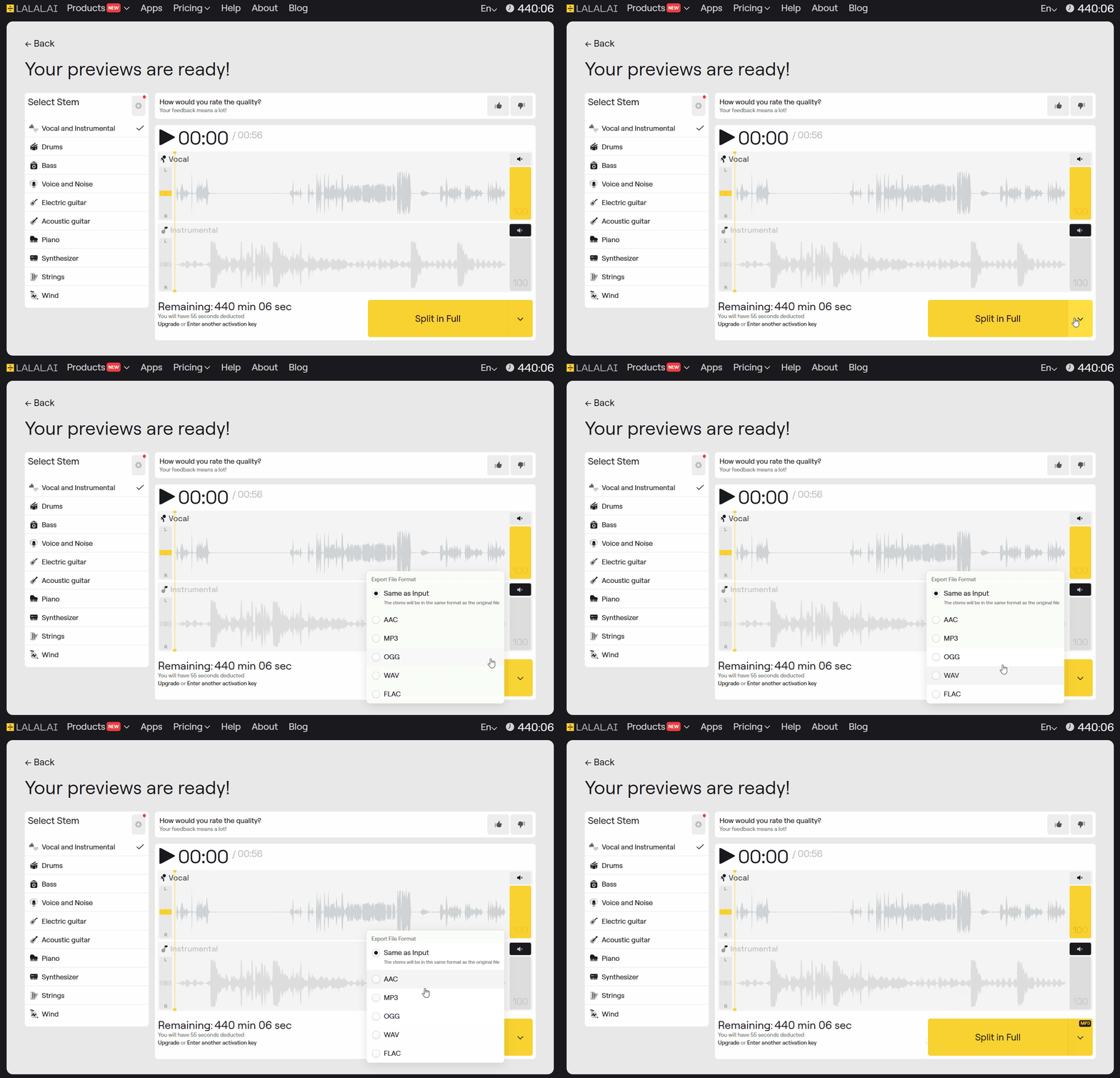
5. Preview the result. The service lets you listen to a short preview of the separated tracks before you commit. If you like what you hear, proceed to process the full file.

6. Download your separated stems. Once processing is done, you’ll be able to download the tracks in your chosen format. Now you can use the vocals, the instrumental, or both – however you like.

That’s it! No conversion headaches, no syncing issues, just clean, separated audio (or video) ready for your next project.
How Can I Use Isolated Stems from a Video Clip?
| Who | Use case | What they extract |
|---|---|---|
| Musicians | Practice with backing tracks, build remixes | Instrumental |
| DJs | Mashups from viral clips | Vocals + Instrumental |
| Video editors | Music without clashing vocals | Instrumental |
| Teachers | Break down songs for students | Individual stems |
| Content creators | Vocal hook in a mashup, vlog bed | Vocals or Instrumental |
This kind of access changes the game for all sorts of creators. Musicians can practice with pro-level backing tracks or build remixes from viral clips. DJs can create mashups on the fly. Video editors can use familiar music without worrying about clashing vocals. Teachers can break down songs for their students, isolating each part for closer study.
It’s not just about utility, either. There’s a kind of joy in hearing a song you love in a new way – discovering hidden harmonies, subtle production choices, or the raw power of a vocal performance. For some, it’s almost like rediscovering the music all over again.
How to Improve the Output Quality: A Few Things to Keep in Mind
Of course, no tool is perfect. Sometimes, you’ll hear faint traces of vocals in the instrumental, or a bit of the beat bleeding into the acapella. In some cases it can be remedied with changing the Enhanced Processing mode in the settings of the LALAL.AI Stem Splitter:

The quality also depends on the original mix, the clarity of the audio, and the complexity of the arrangement. But for most uses, the results are more than good enough.
And while it’s tempting to use your new stems everywhere, remember that copyright still applies. If you’re making something for public release, check the rules and give credit where it’s due.
FAQ
Can you extract vocals from a video file directly?
Yes. LALAL.AI accepts video files directly, such as AVI, MP4, MKV, MOV, and M4V, without any need to convert the video to audio first. The service extracts and separates the audio stems from the video in a single step.
What stems can be extracted from a video clip?
You can extract vocals and instrumental as a pair, or go further and split out drums, bass, synths, electric and acoustic guitar, and other individual instruments. The Vocal and Instrumental option gives you two tracks: the isolated vocals and the music without vocals.
Is LALAL.AI available on mobile for extracting stems from video?
Yes. LALAL.AI is available as a web service and also through desktop apps for Windows and macOS, as well as mobile apps for iOS and Android.
What can I do if there are artifacts in the separated stems?
If you hear faint traces of vocals in the instrumental or bleed between stems, try changing the Enhanced Processing mode in the LALAL.AI Stem Splitter settings, apply another model, upload a better version of the track, or apply de-echo setting to the file. The quality of separation depends on the clarity of the original audio and the complexity of the arrangement.
Can I use extracted stems from video clips commercially?
Copyright still applies to the source material. If you are making something for public release, check the licensing rules for the original track and give credit where required.
Follow LALAL.AI on Instagram, Facebook, Twitter, TikTok, Reddit, and YouTube for more information on all things audio, music, and AI.